

Troubleshooting
Graphics
Section titled “Graphics”My character has bugged textures/graphics. 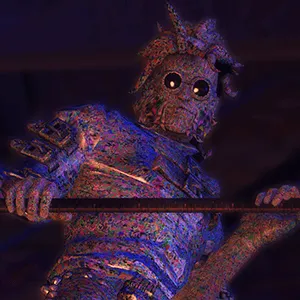
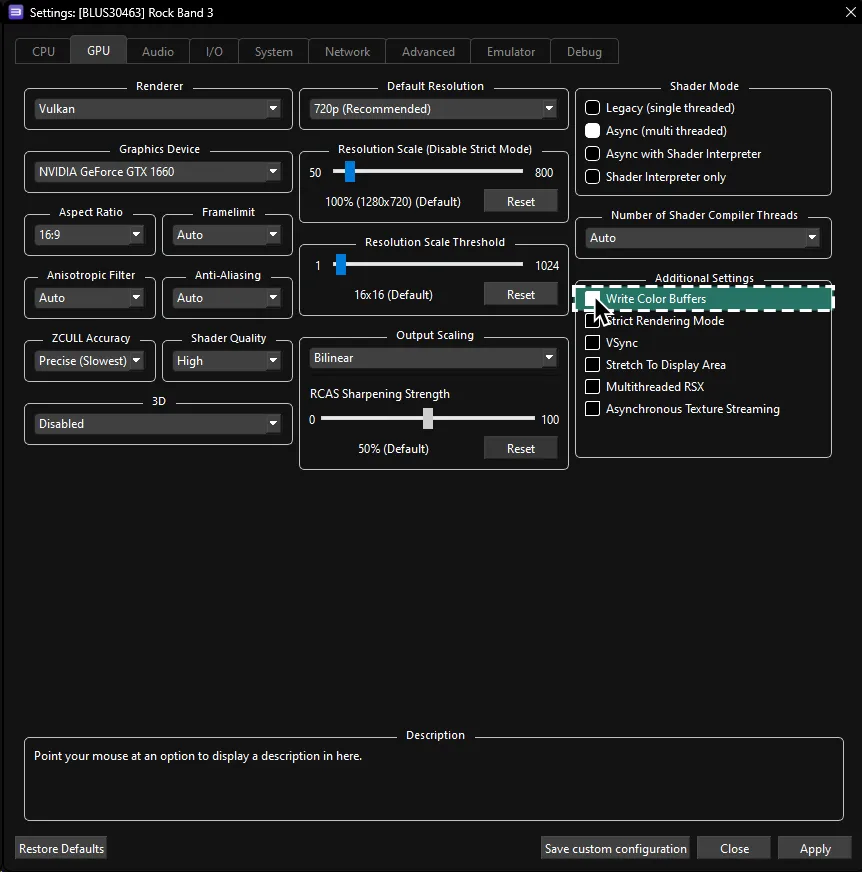
You did not follow the guide and did not install a [quick configuration profile], or did not [enable Write Color Buffers in the GPU section].
My character’s items are teleporting. 
This is an issue that happens on real hardware (PS3) but is MUCH worse on RPCS3.
Thankfully, there is a patch to fix all of this! [Click here for more information].
There’s noticable latency, especially on vocals.
- Lower the
Audio Buffer Durationslider in the [Audio tab when setting up a Custom Configuration] for Rock Band 3.- Alternative disable
Enable Buffering.
- Alternative disable
- Deactivate
Pitch Correctionin Rock Band 3.- To do this, go to
Menu > Options > Vocal Options
- To do this, go to
- Disable
Dolby Digital.- To do this, go to
Menu > Options > System Settings
- To do this, go to
- Connect directly to your sound system and avoid using your TV for audio or HDMI ARC.
My game feels off.
Calibrate your game in Rock Band 3’s System Settings.
- To do this, go to
Menu > Options > System Settings > Calibration.
Rock Band 3 Deluxe allows you to calibrate within a song, too! Pick a familiar song and calibrate to that.
Controllers
Section titled “Controllers”[MIDI Drums] My E-Kit doesn’t work.
- Windows doesn’t let programs share MIDI devices. If you have anything else open that is using the port, close it before starting Rock Band 3 in RPCS3.
- Make sure your E-Kit is mapped correctly and on Channel 10. Refer to [the MIDI Drums page] for more help.
[MIDI Keyboard] My Keyboard doesn’t work.
- Windows doesn’t let programs share MIDI devices. If you have anything else open that is using the port, close it before starting Rock Band 3 in RPCS3.
- Make sure your keyboard is on Channel 1. Refer to [the MIDI Keyboard page] for more help.
- If you’re using a keyboard that has 25 keys, make sure to change the octave to control the menu then again when in a song.
- If you’re on a Rock Band 3 keyboard in MIDI mode, you may have activated drum mode by pressing D-Pad Up. Press D-Pad Up again to toggle it off.
[Guitar Hero guitars] Solos have auto-strum enabled.
Unbind L2 from your guitar in your gamepad configuration by right clicking it.

My PS3 Rock Band instrument controller shows up as two controllers.
You did [controller configuration] for a PS3 Rock Band controller, which usually isn’t needed due to passthrough. Just unbind the controller and it should be fine.
[Pro Drums] Hitting two cymbals registers as a tom.
This is an infamous Rock Band 3 bug called the “double cymbal glitch” and plagues all versions of Rock Band 3, even console versions. You can try to slightly [flam] the two inputs to get around this.
My game locks up when naming things or inviting people.
This varies from controller to controller.
- Try moving the whammy or effects switch on your guitar.
- Reconnect your controller.
- Open the Gamepad Configuration menu and close it.
- Disable the Native Interface as mentioned in [the
Emulatorsection of Custom Configuration]. - Use a standard [gamepad] or keyboard for any sort of character customization or naming.
I cannot use calibrate automatically.
Automatic calibration only works for PS3 Rock Band 2 guitar/bass or a Fender Mustang Pro Guitar controllers with passthrough.
[Pro Guitar] My guitar doesn’t work.
- Pro Guitars require a MIDI interface with SYSEX capabilities. Refer to [your Pro Guitar’s page] to see which interfaces are confirmed to work.
- Windows doesn’t let programs share MIDI devices. If you have anything else open that is using the port (including MIDI Monitor), close it before starting Rock Band 3 in RPCS3.
Crashes
Section titled “Crashes”My game crashes on boot.
- It is likely either your download corrupted or it extracted incorrectly. Try downloading it again.
- If you’re updating from an older version of Deluxe, you may have incompatible Rock Band 3 Deluxe files. You need to go to Rock Band 3’s Game Data folder in
dev_hdd0\game\BLUS30463\USRDIRand delete every.dtafile, exceptdx_high_memory.dta. - Make sure you’re on the latest firmware.
- Double check your copy of Rock Band 3.
- Make sure you actually meet the requirements to play this.
- You probably installed the [High Memory File] and forgot to enable
Debug Console Modein the [Advanced tab when setting up the Custom Configuration] for Rock Band 3.
My game crashes when practicing on regular guitar/bass.
You didn’t read the guide and did not install Rock Band 3 Deluxe, which fixes this.
Online
Section titled “Online”I can’t find a 3rd or 4th player when searching!
- Port 9103 is blocked. You can either enable UPNP in Rock Band 3’s [Network] configuration or manually forward port 9103 (UDP) in your firewall. Don’t enable UPNP while port forwarding as this can cause crashes.
- Rock Band 3 online lobbies can only have 2 slots of Guitar/Bass/Keys, one Drums slot, and one Vocal slot.
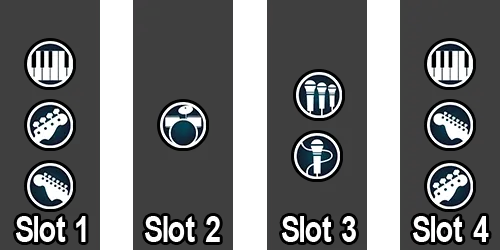
- You can bypass this with Rock Band 3 Deluxe with its ability to change instrument type at
Menu > Options > Deluxe Settings > Advanced > Controller > Change Instrument Type
You will still be able to pick the part you want when the song’s part select screen comes up.
I’m stuck on Registering Account when trying to connect to online servers.
- Make sure you have copied the correct settings in the Rock Band 3’s [Network] configuration.
- You may have lost connection to RPCN and will have to restart the game.
I keep disconnecting constantly while playing online.
- Double check to make sure your connection is stable Try connecting via Ethernet cable if you’re on Wi-Fi.
- If you have increased your VBlank past 60 Hz, [set it back to 60 Hz].
- Get better internet.
My customs aren’t showing up in online lobbies even though we have the same customs.
Please read the [PS3 Customs guide] section on this.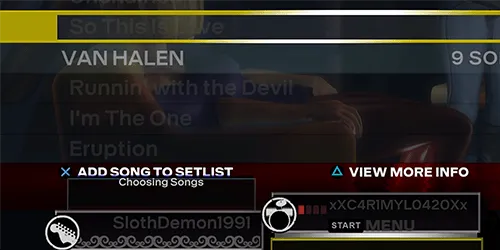
I crash when joining sessions/searching for players.
Your router or provider may have issues with RPCS3’s UPNP feature.
- Go to Rock Band 3’s Custom Configuration [
Network section], and disableEnable UPNP.- You will need to [to set up port forwarding in your router’s control panel].
Deluxe
Section titled “Deluxe”My Deluxe settings are not saving.
You need to change Confirm DX Settings Save to On.
- To do this, go to
Menu > Options > Deluxe Settings > Advanced > Functional Options
I ruined the track camera settings.
Restarting your game will reset them back to normal.
Miscellaneous
Section titled “Miscellaneous”I’m having horrible performance.
- Set your computer to the [High Performance power plan].
- Go back to the [Custom Configuration setup section] and apply suggested low performance tweaks.
- Disable post processing in Deluxe Settings.
- To do this, go to
Menu > Options > Deluxe Settings > Venue Options > Graphics > Post Processing
- To do this, go to
- If you have a four core CPU and a Realtek audio chip (most computers), try installing the latest driver from your motherboard’s “Downloads” page. This is a [known issue] where using the default “High Definition Audio” driver doesn’t use all threads.
- Close out the dedicated Discord client and open it up in your browser or on your phone. You can also try an alternative Discord client [like Vesktop], but we claim no responsibility for your Discord account.
- Increase
Audio Buffer Durationas mentioned in [the Audio tab of Rock Band 3’s Custom Configuration] until the stuttering stops. 64 ms is a great starting point for low end computers.
Scrolling through the library has long pauses.
You didn’t read the guide and did not set the Network Status to Connected in the [Network tab when setting up the Custom Configuration] for Rock Band 3.
My game doesn’t fill the screen.
Activate Overscan in Rock Band 3.
- To do this, go to
Menu > Options > System Settings
I can’t drag and drop PKGs into RPCS3.
This is a known issue with RPCS3. Restart it and it will should work.
You didn’t mention changing (SETTING) in the guide. It helped my performance.
[Open an issue] with your suggestions or contact us on [the MiloHax discord] with your findings. If it checks out, it will probably get added to this guide.