

Setting up REAPER for Rock Band 3 Charts
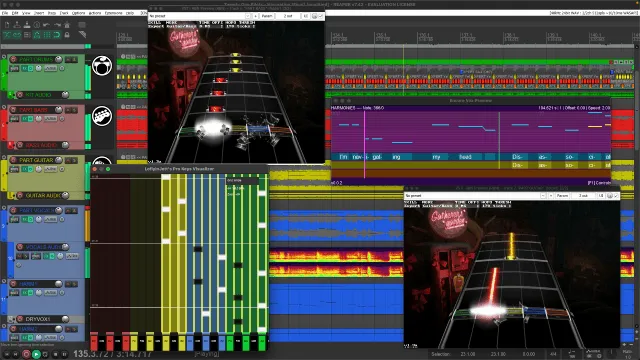
This is a quick setup guide to get REAPER up and running without having to hunt down lots of files from various places.
All of the included resources are confirmed working and made for the latest version of REAPER and Python.
Please refer to the old but reliable [RBN/C3 Authoring Documentation] as it has stood the test of time.
There is also [an amazing book by doa] but keep in mind that certain bits of it suggest installing the outdated version of REAPER. You can and should ignore this.
Likewise, there is [a thorough video by Truce] but once again, you should keep in mind that it may mention that you should install an old version of REAPER. You can and should ignore this.
If you have questions or get stuck, you can ask for help in the [MiloHax Discord]. There’s even a [dedicated charting channel].
Installing REAPER
Section titled “Installing REAPER”-
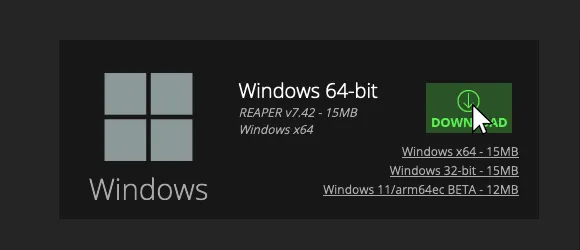
[Download and install the latest 64-bit version of REAPER.].
- Please DO NOT enable the
Portable installoption when installing!
- Please DO NOT enable the
-
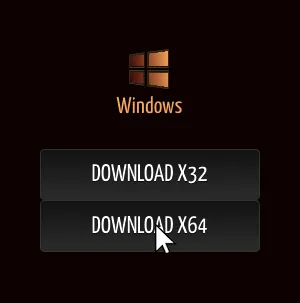
[Download and install the latest 64-bit version of SWS / S&M Extension.].
- Please keep
Python ReaScript supportenabled when installing!
- Please keep
-
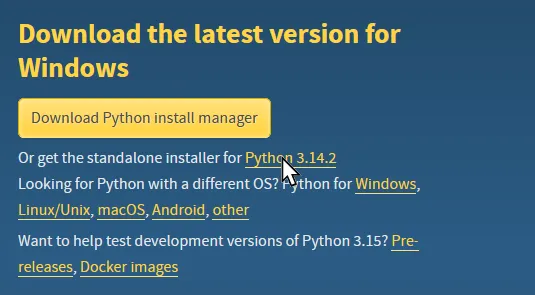
[Download and install the latest version of Python 3 if you don’t have it already.].
- Do NOT download Python install manager!
- Python 2 is NOT the same and will not work.
-
[Click here to download the REAPER Files

.ziparchive.].- a. Extract the
.ziparchive somewhere convenient. - b. Drag the
Commonfolder intoDRAG 'Common' HEREshortcut. - c. Drag
REAPERinto theDRAG 'REAPER' HEREshortcut. - d. Replace any files if you’re asked.
- a. Extract the
Adjustments after installing REAPER
Section titled “Adjustments after installing REAPER”-
Open REAPER
-
Click on
Options>Preferences.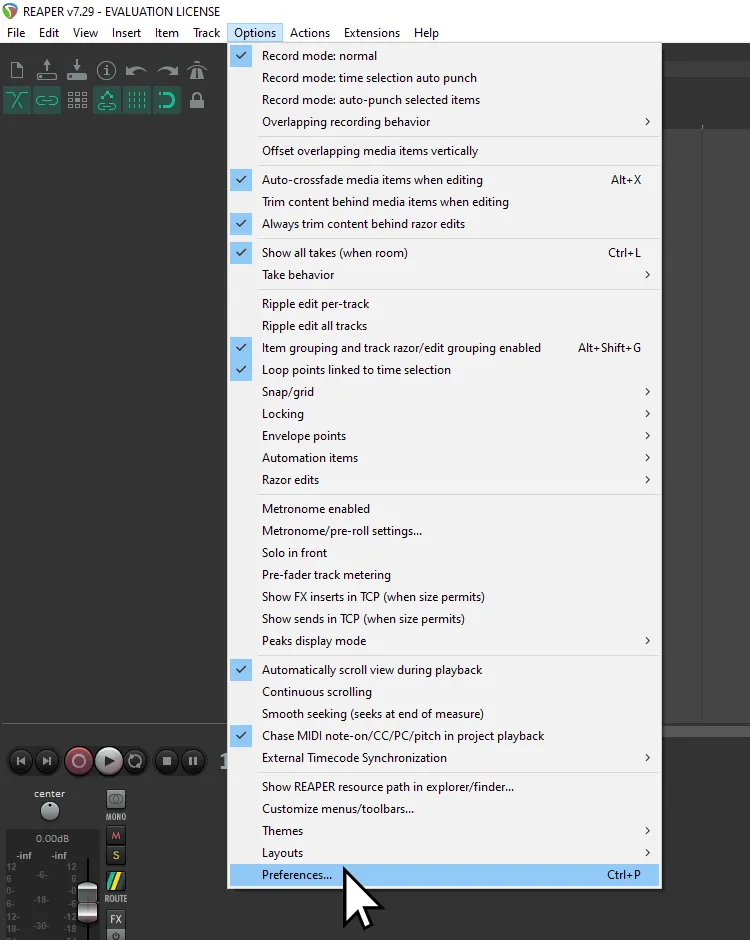
-
Scroll down to
Project -
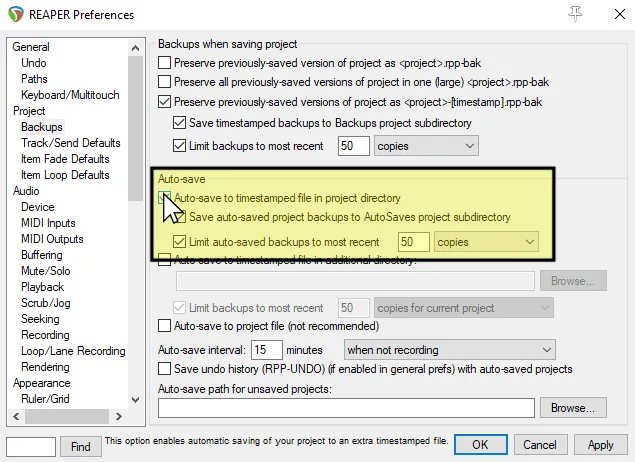
Click on
Backups.- a. Enable
Auto-save to timestamped file in project directory.
- a. Enable
-
Scroll down to
Audio. -
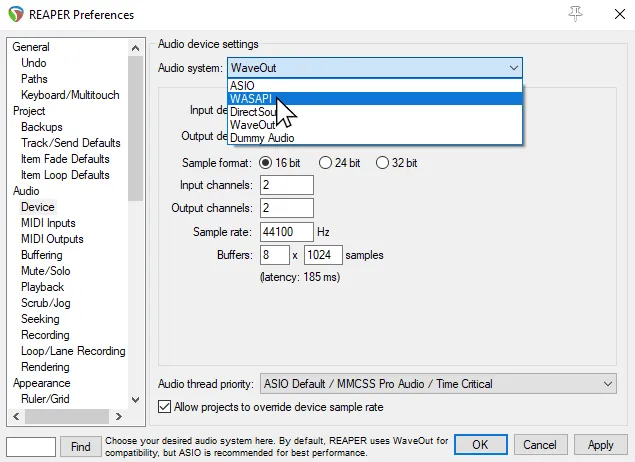
Click on
Device.- a. Change
Audio SystemtoWASAPI.
- a. Change
-
Scroll down to
Media. -
Click on
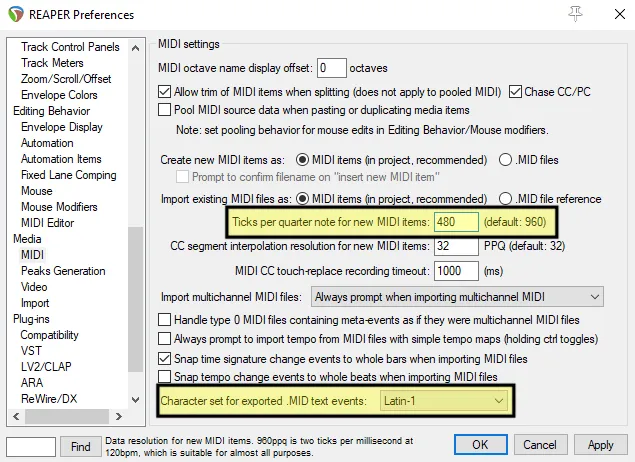
MIDI.- a. Change
Ticks per quarter note for new MIDI itemsto480. - b. Change
Character set for exported .MID text eventstoLatin-1.
- a. Change
-
Scroll down to
Plug-ins -
Click on
ReaScript -
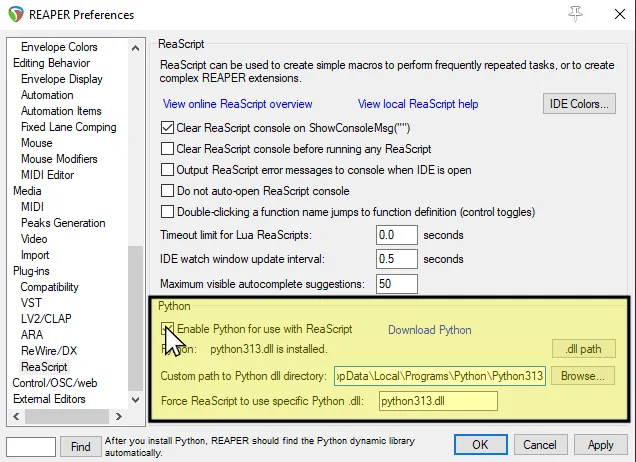
Enable
Python for use with ReaScript.- a. If Python isn’t found, it’s usually in
%LOCALAPPDATA%\Programs\Python[Python Version] - b. The DLL will always be “
Python[version].dll”, i.e.Python312.dll
- a. If Python isn’t found, it’s usually in
Important keybinds
Section titled “Important keybinds”The following shortcuts have been added:
- F6 - [Pro Keys Preview]: See your Pro Keys chart in real time.
- F7 - [EVENTS Tools]: Tools for the EVENTS track.
- F8 - [EncoreVoxPreview]: See your vocal chart in real time.
- F9 - [CAT]: Various tools for customs authors.
- F10 - [VenueGen]: Tools for creating VENUES.
- K - Makes a count off. You have to click on bar 2 before pressing this.
- Reminder to tempo map first then chart because the count in will shift everything right!
- Q - Sets tempo by bar depending on where your cursor is.
- SHIFT+Q - Move closest grid line to mouse cursor while holding.
- SHIFT+L - Import lyrics for selected notes from file.
- NUMPAD 9 - Set note lengths to grid size.
Other essential stuff
Section titled “Other essential stuff”It’s worth checking this stuff out!
- [RBN/C3 charting guide] - The essential guide on charting for Rock Band. Written by Harmonix and with parts added by the C3 team.
- [MAGMA] - A tool to compile your custom so it can go in the game. It’s still in use and has been improved over the years.
- [Nautilus (formerly known as C3 CON Tools)] - The Swiss army knife of Rock Band stuff. Lots of great and specific tools for customs.
- [Onyx] - A must have tool if you’re testing on RPCS3 as it can export into a modern PS3 format.
- [Ultimate Vocal Remover GUI] - Contrary to what the name is, this does a lot more than just remove vocals. This is AI stem separation software that can greatly help in separating a song into separate elements to help with charting. The version linked is a beta version that includes the ability to import Roformer models. Here are the suggested models:
- Demucs:
- htdemucs_ft - Essential. Separates into four instruments.
- htdemucs_6s - Essential and gives you six instruments instead of the usual four.
- hdemucs_mmi
- htdemucs
- MDX-NET
- UVR-MDX-NET INST HQ 3 or 5 - Essential as it usually gives better vocal isolation than Demucs.
- [Drumsep] - Essential as it separates a stereo drum track into various elements. Helps a ton with drum charting.
- Demucs:
- [Pro Guitar Guide] - You’re probably never gonna touch Pro Guitar/Bass, but for the masochists, this is the only good guide out there.
Troubleshooting
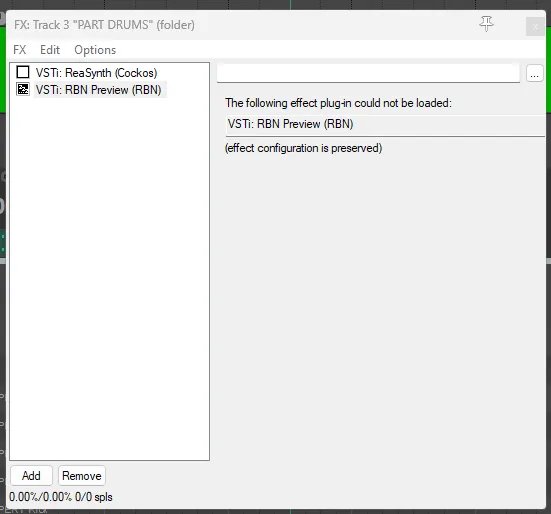
Section titled “Troubleshooting”- RBN Preview doesn’t load!
- You’re missing the appropriate Microsoft Visual C++ Redistributable Runtimes. [Click here to download them].
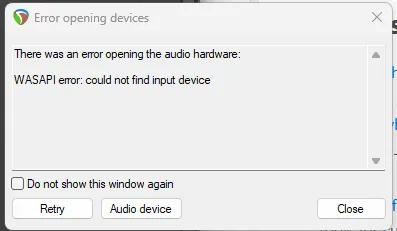
- I get “Error opening devices” when swapping to WASAPI!
Could not find input device: You probably don’t have a microphone connected Change the “Input channels” to0in the Device section of Preferences.
Credits
Section titled “Credits”This pack includes files from the following projects:
- [reaimgui]
- [C3 Authoring Tools]
- [EncoreVocalPreview]
- [EVENTS Tools]
- [RB-Pro-Keys-Visualizer]
- [ProToLH]
- [Venuegen]
- [Pro Guitar Preview for REAPER]
- [SpanishLA JEFE01 LangPack]
- [Português LangPack]
- [RB Icons]
- Harmonix RBN (link no longer available)
- [C3]
Many thanks to:
- AddyMills - helping improve the template
- Aloquendiar - helping with the updated version of Venuegen and screenshots
- C0Assassin - helping improve the template
- Deevun155 - porting the updated version of Venuegen
- ElFish - bringing up the Python3 port of CAT to my attention
- farottone - creating and contributing to the original C3 Authoring Tools and many other foundational projects
- Glitchgod
- For some error screenshots
- Kueller - creating and contributing in many of the original versions of the tools
- Linos - helping improve the template and being one of the most helpful in the charting channel
- Loflyinjett - answering our prayers and getting us a Pro Keys preview tool
- Lore Hero - motivating me to move this info out of a single Discord channel and providing us with amazing content
- Lunalawl - coming up with most of the idea. She is currently working on making this even easier
- Lynxeption - helping testing, helping put the archive together, and screenshots
- maria/solamint - contributing to Encore Vox Preview
- TheNathannator - providing with the original RBN files and being one of the nicest people ever
- Nemo - creating and maintaining various essential tools that are still in use to this day
- Onyxite - creating and maintaining Onyx, one of the best inventions for plastic guitar games
- poliwhirlge
- For updates to CAT
- RaiderGG - creating EVENTS Tools
- Ruggy - icons, Pro Guitar stuff, testing and helping improve the template
- seil - creating the Pro Guitar sound preview tool
- Sulfrix
- For certain Python screenshots
- SuperRiderTH - porting the updated version of C3 Authoring Tools
- ThreeAreEss - testing and helping improve the template
- tposejank - creating and contributing to Encore Vox Preview
- Many other people whose names are sadly forgotten as of writing this.