

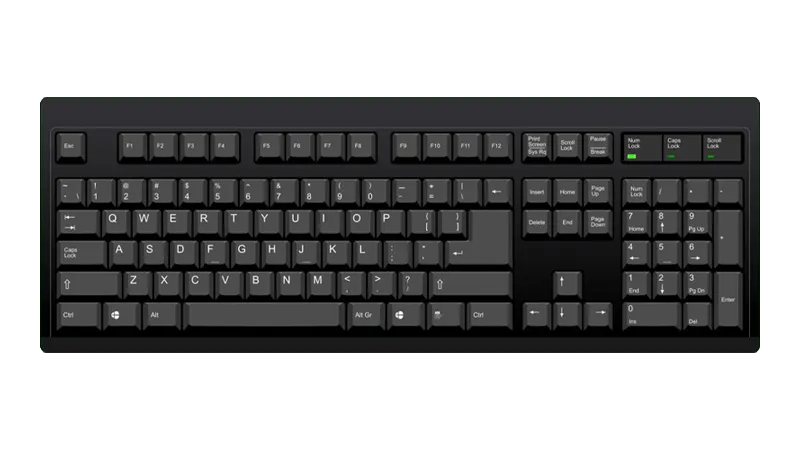
PC Keyboard

- To bind multiple keys to one button, hold Shift then click on the button you want to assign multiple keys to.
- You will need to set the “Stick Multiplier” and “Stick Interpolation” for Left and Right to
0.90for whammy to function correctly. - To play Guitar/Bass/Keys/Drums parts on a Controller (Padtar), you will need Rock Band 3 Deluxe.
- You can also rebind your controller within Deluxe.
Menu > Options > Deluxe Settings > Advanced > Controller > Pad Button Remap
- You can also rebind your controller within Deluxe.
How do I map my keyboard?
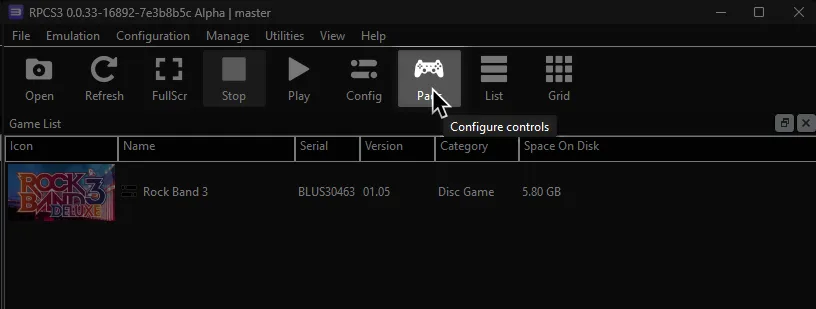
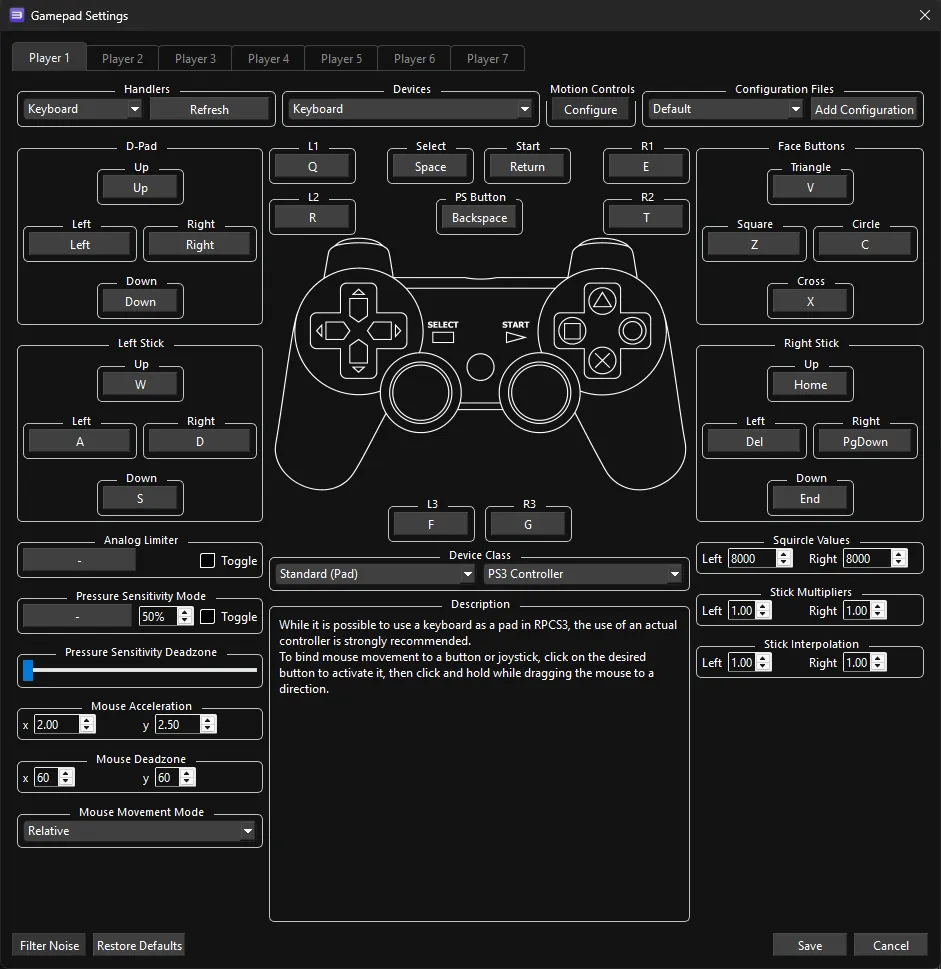
Click on the Pads icon at the top of RPCS3.
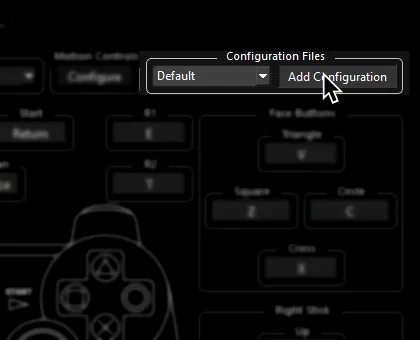
It’s suggested to create a new configuration by clicking Add Configuration at the top right of the Pads window.
This is so you can change configuration profiles in case you want to play other games.
Follow the instructions and/or match the assignments below.
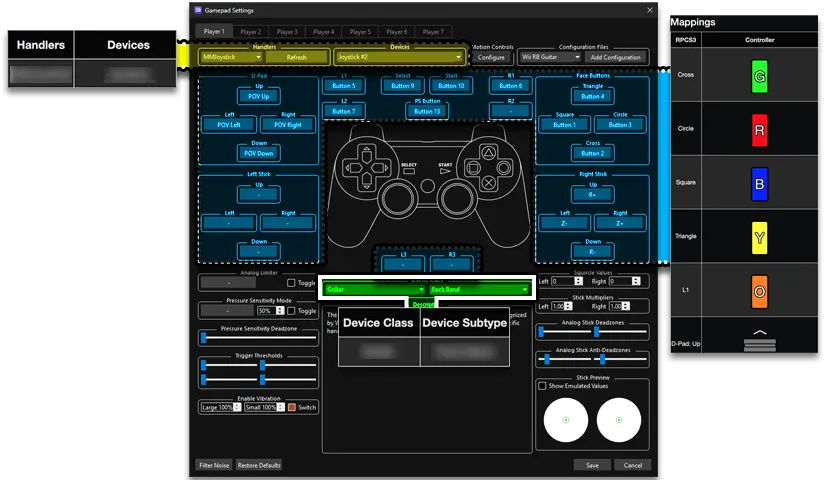
Default Mapping
Section titled “Default Mapping”These are the default keyboard mappings that come with RPCS3.
- This profile is strictly for menus and for vocalists that lack a proper controller.
Pad Information
Section titled “Pad Information”| Handlers | Devices |
|---|---|
| Keyboard | Keyboard |
| Device Class | Device Subtype |
|---|---|
| Standard (Pad) | PS3 Controller |
| RPCS3 | Keyboard | Alt Use 1 | Alt Use 2 |
|---|---|---|---|
| Cross | X | Select | |
| Circle | C | Back | Mic 3 Volume (Song) |
| Square | Z | Mic 1 Volume (Song) | |
| Triangle | V | View More Info (Library) | Mic 2 Volume (Song) |
| D-Pad | Up, Down, Left, and Right | Navigation | |
| Left Stick | W, A, S, and D | Navigation | |
| Start | Return | Options | Pause (Song) |
| Select | Space | Overdrive | |
| L1 | Q | Guide Part Selection (Practice) | |
| L2 | R | Vocal Part Selection (Practice) | |
| R1 | E | Vocal Track Volume (Song) | |
| R2 | T | Pitch Correction (Song) |
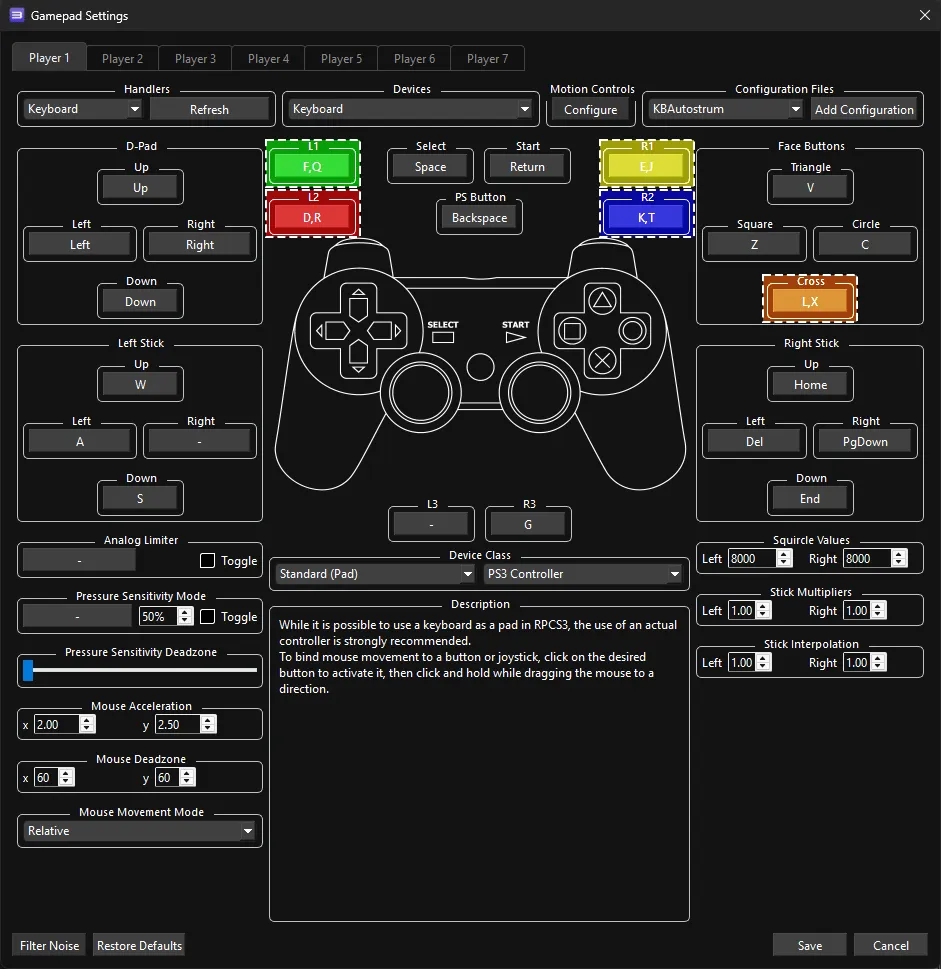
Autostrum
Section titled “Autostrum”A profile heavily inspired by Fortnite Festival’s keyboard scheme. Modified by lunalawl.
- This profile does not require strumming.
- To bind multiple keys to one button, hold Shift then click on the button you want to assign multiple keys to.
Pad Information
Section titled “Pad Information”| Handlers | Devices |
|---|---|
| Keyboard | Keyboard |
| Device Class | Device Subtype |
|---|---|
| Standard (Pad) | PS3 Controller |
| RPCS3 | Keyboard | Guitars/Bass/Keys | Alt Use 1 | Alt Use 2 |
|---|---|---|---|---|
| L1 | D, and R |  | Guide Part Selection (Practice) | |
| L2 | F, and Q |  | Vocal Part Selection (Practice) | |
| R1 | E, and J |  | Vocal Track Volume (Song) | |
| R2 | K, and T |  | Pitch Correction (Song) | |
| Cross | L, and X |  | Select | |
| Circle | C | Back | Mic 3 Volume (Song) | |
| Square | Z | Mic 1 Volume (Song) | ||
| Triangle | V | View More Info (Library) | Mic 2 Volume (Song) | |
| Left Stick: Up | W, and Left Shift |  | Navigation | |
| Left Stick: Left | A | Navigation | ||
| Left Stick: Down | S | Navigation | ||
| Left Stick: Right | D | Navigation | ||
| D-Pad: Up | Up | Navigation | ||
| Start | Return | Options | Pause (Song) | |
| Select | Space | Overdrive | Pause (Song) |
Manual Strum Guitars/Bass/Keys
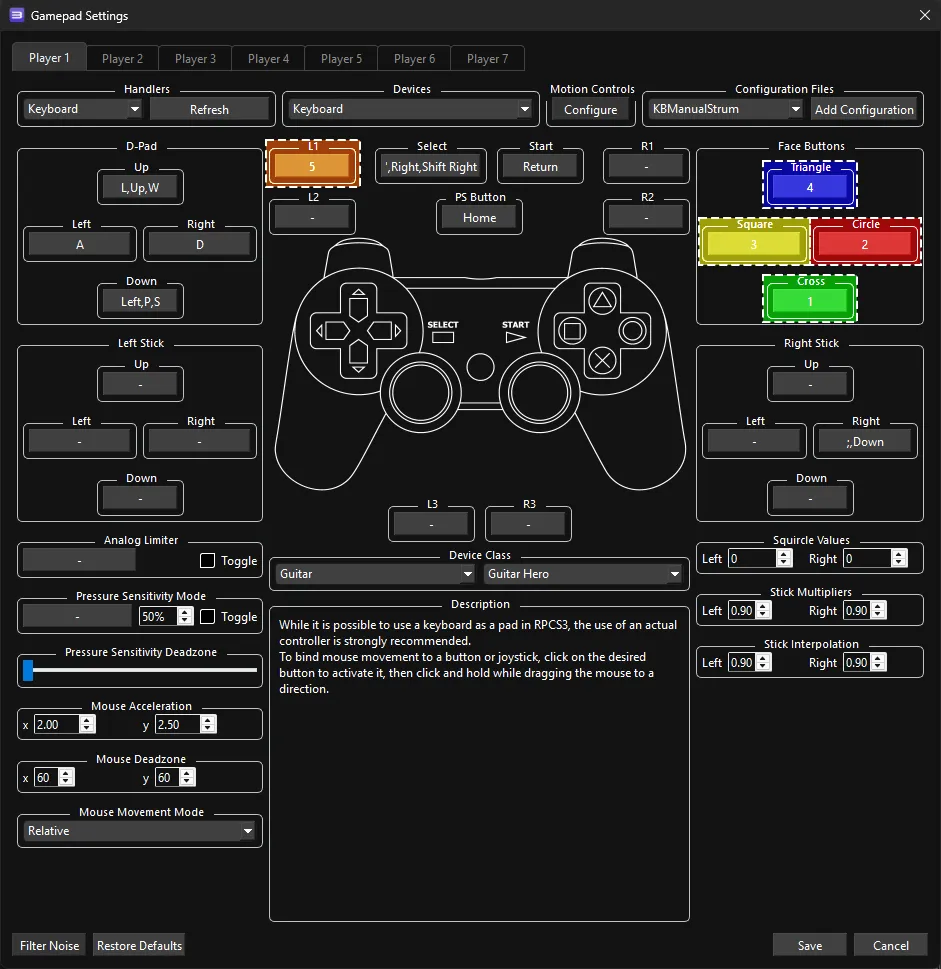
Section titled “Manual Strum Guitars/Bass/Keys”A profile inspired by both Fortnite Festival’s Pro bindings and Frets on Fire. Modified by Doom05 to work a bit better with Rock Band 3.
- This profile requires strumming. While holding a fret, press the strum buttons.
- To bind multiple keys to one button, hold Shift then click on the button you want to assign multiple keys to.
Pad Information
Section titled “Pad Information”| Handlers | Devices |
|---|---|
| Keyboard | Keyboard |
| Device Class | Device Subtype |
|---|---|
| Guitar | Guitar Hero |
| RPCS3 | Keyboard | Guitars/Bass/Keys |
|---|---|---|
| Cross | 1 | |
| Circle | 2 | |
| Square | 3 | |
| Triangle | 4 | |
| L1 | 5 | |
| D-Pad: Up | L, and Up Arrow |  |
| D-Pad: Down | P, and Left Arrow |  |
| D-Pad: Up | W | Navigation |
| D-Pad: Left | A | Navigation |
| D-Pad: Down | S | Navigation |
| D-Pad: Right | D | Navigation |
| Right Stick: Right | ;, and Down Arrow | |
| Select | ', and Right Arrow | Overdrive |
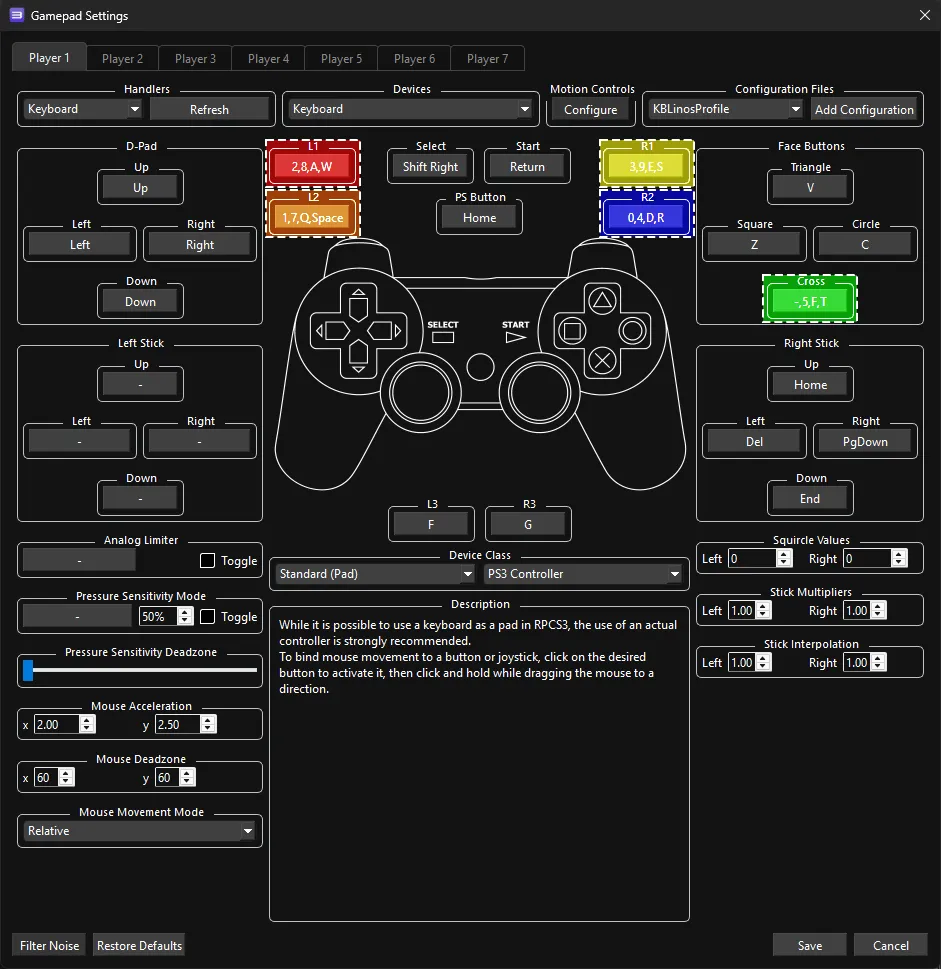
Linos’ Profile
Section titled “Linos’ Profile”A profile used by MiloHax’s favorite keyboard player. Has plenty of alt-keys for acceptable drumming as well as guitar playing.
- This profile does not require strumming.
- To bind multiple keys to one button, hold Shift then click on the button you want to assign multiple keys to.
Pad Information
Section titled “Pad Information”| Handlers | Devices |
|---|---|
| Keyboard | Keyboard |
| Device Class | Device Subtype |
|---|---|
| Standard (Pad) | PS3 Controller |
| RPCS3 | Keyboard | Guitars/Bass/Keys | Drums | Alt Use 1 | Alt Use 2 |
|---|---|---|---|---|---|
| L1 | 2, 8, A, and W | |  | Guide Part Selection (Practice) | |
| L2 | 1, 7, Q, and SPACE | |  | Vocal Part Selection (Practice) | |
| R1 | 3, 9, E, and S | |  | Vocal Track Volume (Song) | |
| R2 | 0, 4, D, and R | |  | Pitch Correction (Song) | |
| Cross | -, 5, F, and T | |  | Select | |
| Circle | C | Back | Mic 3 Volume (Song) | ||
| Square | Z | Mic 1 Volume (Song) | |||
| Triangle | V | View More Info (Library) | Mic 2 Volume (Song) | ||
| D-Pad: Up | Up | Navigation | |||
| D-Pad: Left | Left | Navigation | |||
| D-Pad: Down | Down | Navigation | |||
| D-Pad: Right | Right | Navigation | |||
| Select | Shift Right | Overdrive | Overdrive | Filters (Library) |

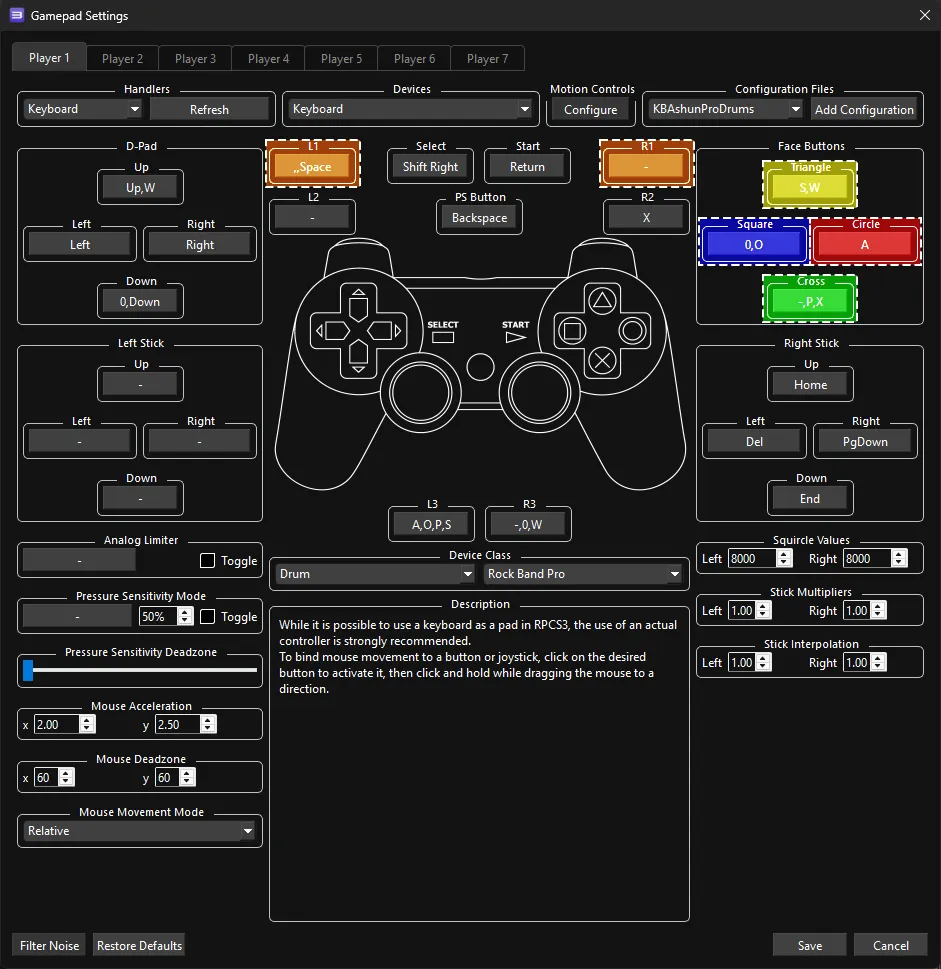
Ashun Pro Drums
Section titled “Ashun Pro Drums”A profile used by our favorite Colombian key-drummer, Ashun. Scientists are still questioning how anyone could use this profile.
- To bind multiple keys to one button, hold Shift then click on the button you want to assign multiple keys to.
- If you don’t bind all modifiers, you will have dropped notes.
Pad Information
Section titled “Pad Information”| Handlers | Devices |
|---|---|
| Keyboard | Keyboard |
| Device Class | Device Subtype |
|---|---|
| Drum | Rock Band Pro |
| RPCS3 | Keyboard | Drums |
|---|---|---|
| Circle | A | |
| Triangle | S | |
| Square | O | |
| Cross | P | |
| Triangle | W |  |
| Square | 0 |  |
| Cross | - |  |
| L1 | , and Space | |
| R1 | C |  |
| L3 | A, O, P, and S | Pad Modifier |
| R3 | W, 0, and - | Cymbal Modifier |
| D-Pad: Up | W | Yellow Cymbal Modifier |
| D-Pad: Down | 0 | Blue Cymbal Modifier |
Profiles
Section titled “Profiles”How do I use profiles?
After downloading the profile,
-
Extract the .7z file.
-
Drag the
input_configsfolder into theconfigsfolder where you have RPCS3 in.
-
After that, you can select the profile in the “Pads” menu.
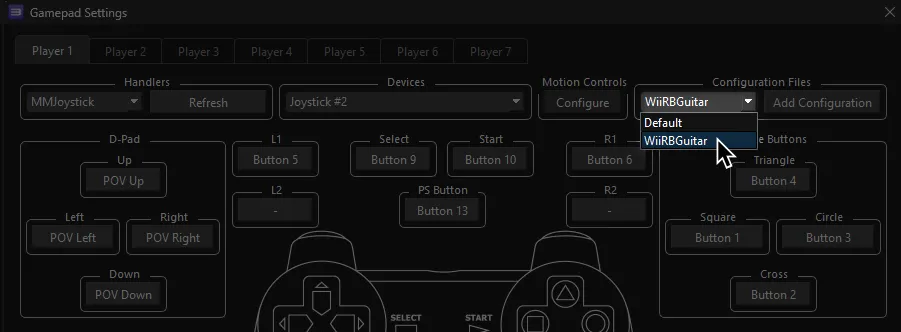
Most of the time, these controller profiles should work out of the box. If they don’t, try changing the controller listed in Devices, next to the Refresh button until it receives an input. You can edit this while the game is running.
Research by [Linos]
Alternative mapping schemes by [lunalawl], [Doom05], and [Ashun]